
Call Queue Sequence
Step 1: Navigate to Incoming Call Settings
From your dashboard, click:
”
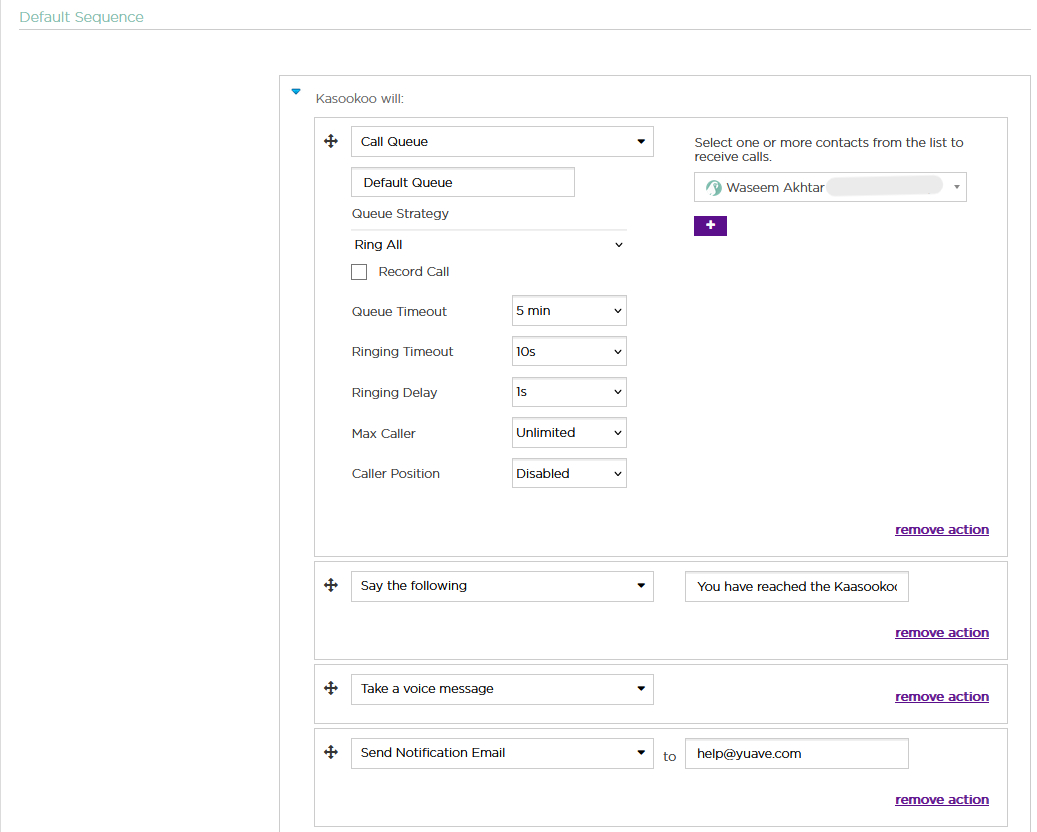
Step 2: Under Default Sequence, Select “Call Queue”
🛠️ Queue Setup Options
Name the Call Queue
Give your queue a clear, descriptive name (e.g., “Support Team”, “Sales Enquiries”).
Choose the Queue Strategy
Select how you want calls to be distributed from the Queue Strategy dropdown.
➡️ See strategy details below.
Enable Call Recording (Optional)
Toggle this option if you'd like to record calls for quality assurance or compliance.
Add Agents to the Queue
Select the Kasookoo app users to include in this queue.
⚠️ Note: GSM numbers (external/mobile lines) cannot be added to a queue.
⚙️ Call Handling Preferences
Queue Timeout – Total time a caller is allowed to wait in the queue
Ring Timeout – Time to ring one agent before moving to the next
Ringing Delay – Time before the first agent is rung
Max Callers – Maximum number of callers allowed in the queue simultaneously
🆘 Fallback Actions When No One Is Available
Type a message into the “Say the Following” box (e.g., “All our agents are currently busy…”)
Add follow-up actions:
Take a Voice Message
Send Voicemail to Email (specify recipient address)
Queue Strategy Options Explained
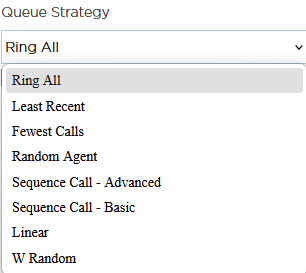
When setting up how calls are distributed among your team, you can choose from several Queue Strategy options:
Ring all (Default)
Description: Rings all available agents at once until one answers.
Use Case: Ideal when you want the fastest possible response.
least recent
Description: Rings the agent who was least recently active (i.e., last answered a call the longest time ago).
Use Case: Distributes calls more evenly over time.
fewest calls
Description: Rings the agent with the fewest completed calls from this queue.
Use Case: Balances call load over agents.
random
Description: Rings a random agent.
Use Case: Rarely used in production, but good for testing or very even load.
rrmemory (Round Robin with Memory) - Sequence Advanced
Description: Rings agents in a round-robin fashion and remembers where it left off.
Use Case: Fairly distributes calls in a predictable cycle.
Rrordered – Sequence Basic
Description: Like rrmemory, but preserves the order of agents as defined in the config file.
Use Case: When agent priority/order is important.
linear
Description: Rings agents in the exact order defined in the configuration file (or added order, if dynamic).
Use Case: Priority-based routing from top to bottom.
wrandom (Weighted Random)
Description: Rings a random agent, but considers penalty values as weights (higher penalty = lower priority).
Note: Penalty here affects the weight, not agent eligibility as in other strategies.
Use Case: Load balancing with configurable preferences.
✅ Final Step: Save Your Queue
Once all configurations are complete, click Save to activate your Call Queue.
Updated about 1 year ago