
How to forward calls to GSM Network?
📲 How to Forward Calls to a GSM Network
1️⃣ Log in to Your Kasookoo Dashboard
Access your account at: www.kasookoo.com/login
2️⃣ Navigate to “Incoming Call Settings”
From the dashboard menu, go to:
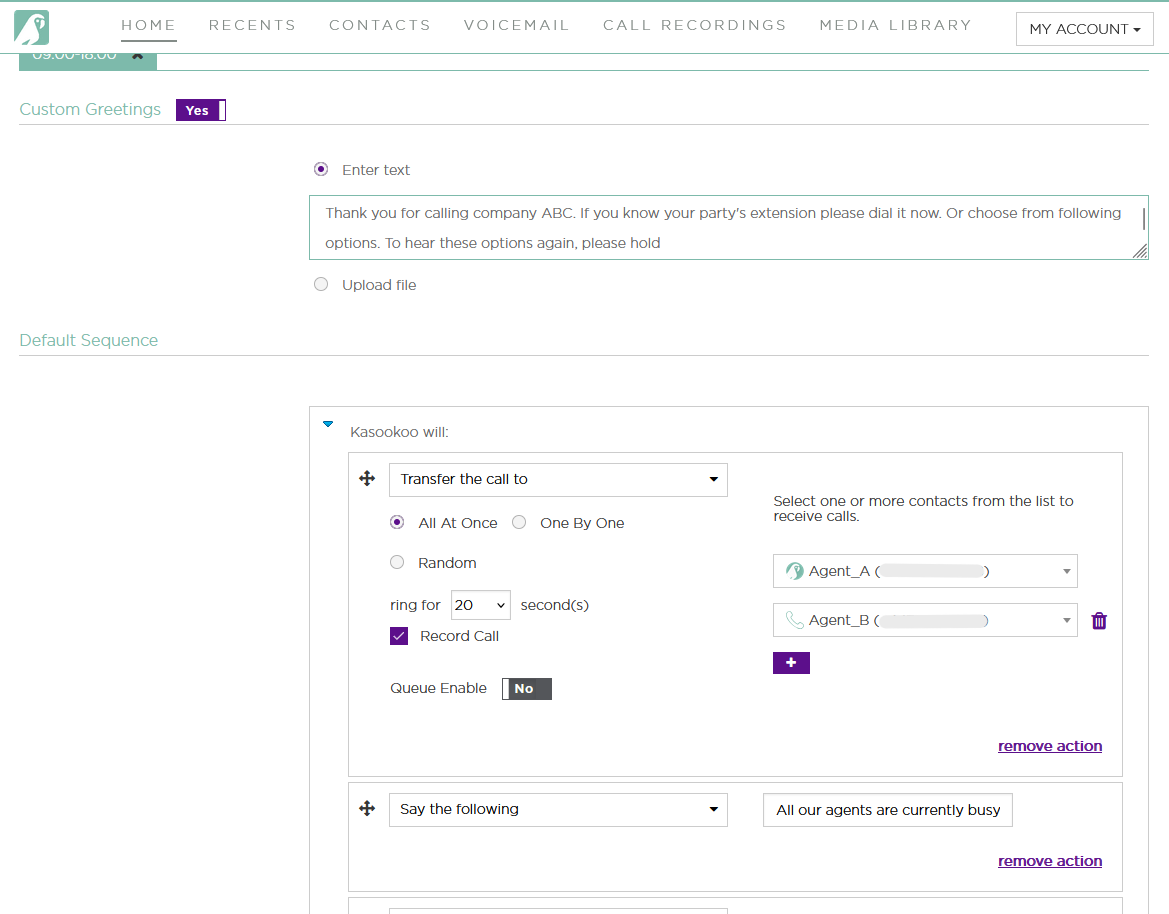
3️⃣ Under Agent Routing, Select “Transfer Call To”
You will see a list of agents, each with two icons:
🟣 Kasookoo Logo – Routes the call via the Kasookoo app
📞 Telephone Icon – Routes the call to the agent’s mobile (GSM) number
4️⃣ Click the Telephone Icon
To forward the call to a mobile number, select the telephone icon next to the appropriate agent’s name.
✅ The icon will highlight to confirm your selection.
5️⃣ Click “Save” at the Bottom
Scroll down and click “Save” to apply the call forwarding rule.
💡 Tip:
Ensure the agent's GSM number is saved correctly in their profile settings — otherwise, the call cannot be routed to their mobile.
Updated about 1 year ago