
Call Statistics OverView
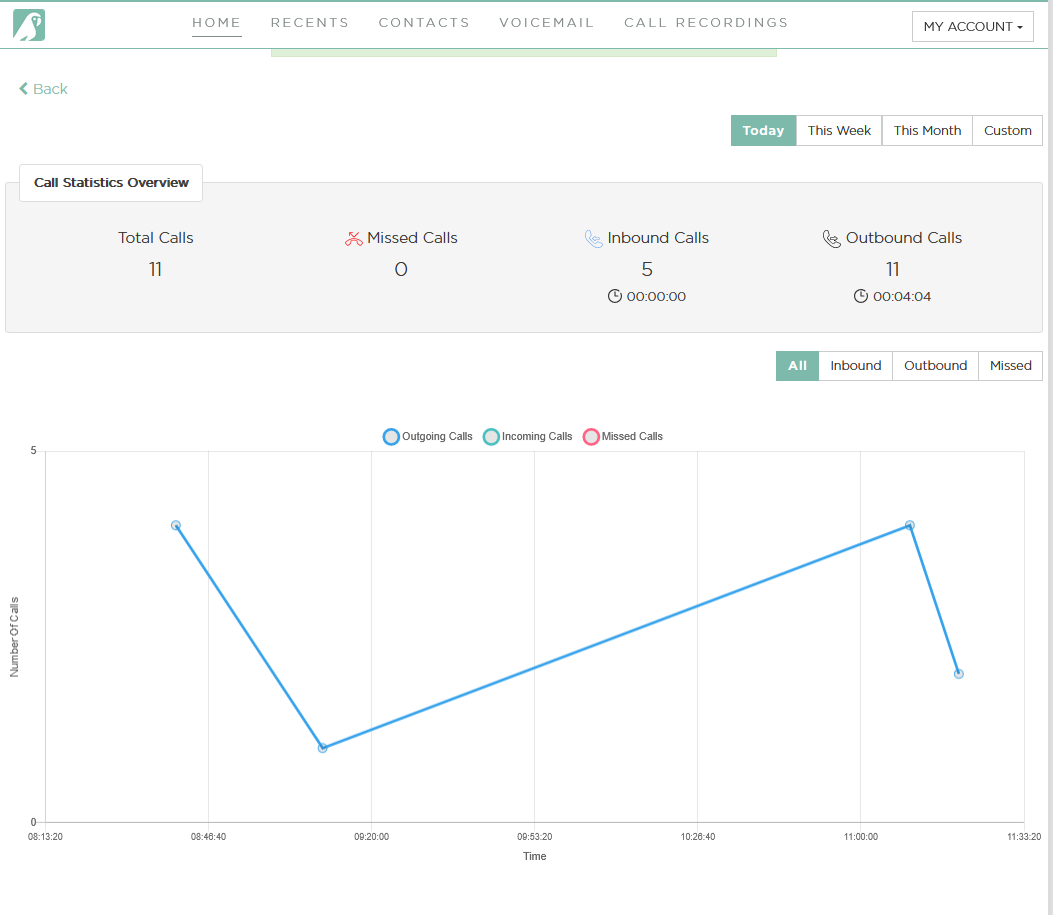
The Call Statistics feature provides a comprehensive overview of all calls made by agents. It allows users to analyze call performance through various filters and graphical representations.
🔍 How to Access
1️⃣Log in to your Kasookoo Dashboard
2️⃣Navigate to “Call Statistics” from the main menu
📌 Key Features
📅 Time-Based Filtering
View data by:
Day
Week
Month
Or select a custom date range
📞 Call Type Filtering
Filter call data by:
Inbound Calls – Received by agents
Outbound Calls – Made by agents
Missed Calls – Unanswered calls
👥 Agent & Business Number Filtering
Choose specific agents to assess individual performance
Filter by business phone numbers to analyze line-specific call activity
📈 Graphical Representation
Select how you’d like to view your data:
Linear Graph – See call volume trends over time
Bar Graph – Compare performance across different periods or agents
🧠 Use Case Tips
Use Custom Date Ranges to align reporting with campaign periods or team shifts
Use Missed Call filters to identify staffing gaps or queue inefficiencies
Toggle between graph views to suit performance review meetings or presentations
Updated about 1 year ago