
Default Sequence
Select “Incoming Call Settings”
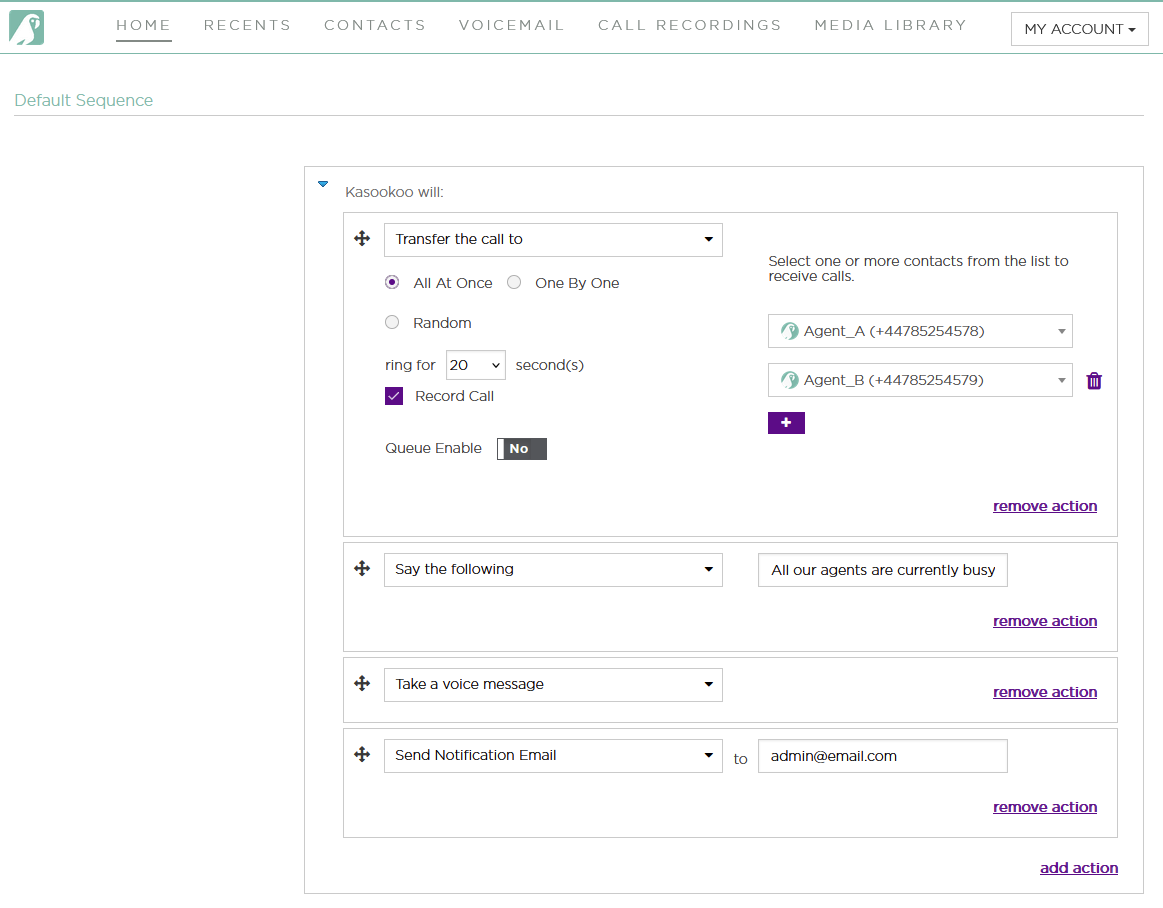
1️⃣ Transfer the Call To
Choose who should receive incoming calls from your Team List:
🟣 Kasookoo logo = Call via the Kasookoo app
📞 Telephone logo = GSM network transfer (may incur additional charges)
You can set a default call sequence by selecting one or multiple users.
2️⃣ Choose How Incoming Calls Are Routed
Decide how calls should ring among selected team members:
🔔 Ring All – Everyone rings at the same time
🎲 Ring Randomly – Rings to a random available team member
🔁 Ring in Order – Rings individuals in the specific order you define
3️⃣ Set Ring Duration
If using a ring order, you can set how long each team member’s device should ring before the call moves to the next.
4️⃣ Record Incoming Calls
Toggle Record Call to enable call recordings for all inbound calls.
5️⃣ Enable Queue (Optional)
Turn on Queue if you want callers to be placed on hold until someone becomes available.
6️⃣ When No One Is Available
Set a fallback response:
Type a message into the “Say the Following” box (e.g., “All our agents are currently busy…”)
Add actions like:
✅ Take a voice message
📧 Send voicemail to email (enter the email address for notifications)
✅ Don’t Forget to Click “Save”
Once all settings are configured, click Save to apply your incoming call handling rules.
Updated about 1 year ago