
How do I view call recordings?
Call Recordings Tab
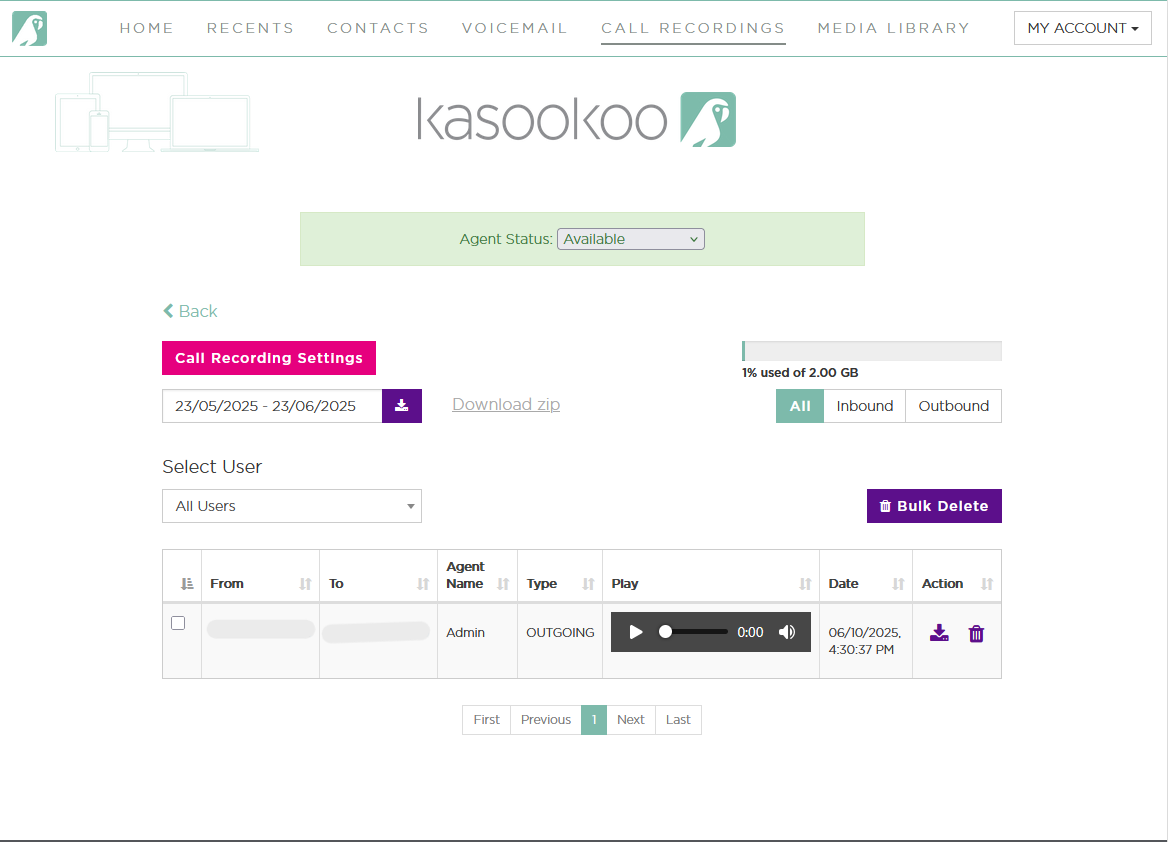
The Call Recordings tab allows you to access, review, and manage your recorded calls for quality control, training, or compliance.
🔍 Features:
📅 Filter by Date:
Choose a date range to view call recordings for a specific time period.
👤 Select User:
Filter recordings by individual user or view all users.
🔄 Call Type Filters:
Choose to view only Inbound, Outbound, or All call recordings.
▶️ Playback Option:
Listen to call recordings directly within the system.
📥 Download Recordings (Zip):
Select up to one week of recordings at a time
Click “Download Zip” to save them in bulk
Allow 10–15 minutes for the system to compile and load the file
🗑️ Bulk Delete:
Select multiple recordings and delete them in a single action.
📦 Storage Usage Indicator:
See how much of your recording storage is currently used (in %).
🛠️ Actions Per Recording:
Action Icon Description
▶️ Play Play Button Stream the recording directly
⬇️ Download Download Icon Save the file locally
🗑️ Delete Trash Bin Icon Permanently remove the recording
This tab is essential for call monitoring, agent performance reviews, and ensuring your team remains compliant with business communication standards.
Updated about 1 year ago