
How to Change Agent Status
How to Change Your Status in Kasookoo
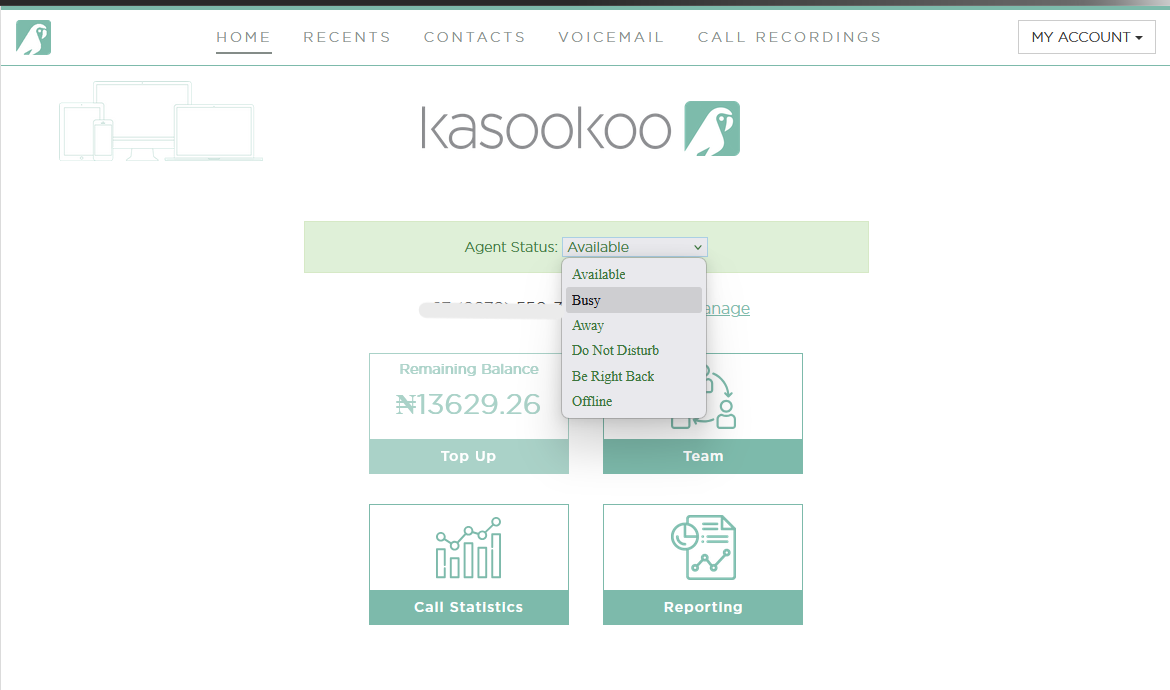
1️⃣ Login to the Kasookoo portal
Go to www.kasookoo.com/login and log in with your credentials.
2️⃣ Locate the Agent Status section
On your dashboard, find the Agent Status section — it’s just under the Kasookoo logo.
3️⃣ Open the status menu
Click the drop-down menu next to Agent Status.
4️⃣ Select your desired status
Choose from the 6 available options:
✅ Available – Ready to receive calls.
🔴 Busy – Currently on another task or call.
🟡 Away – Temporarily away from your desk.
🚫 Do Not Disturb – No calls or notifications.
⏳ Be Right Back – Stepping away briefly.
⚪ Offline – Not working or logged out.
Updated about 1 year ago
Did this page help you?